Using FlowAI well
What the assistant can see, what it can change, how the confirmation step works, and what stops it running up a bill.
Updated 2 September 2026
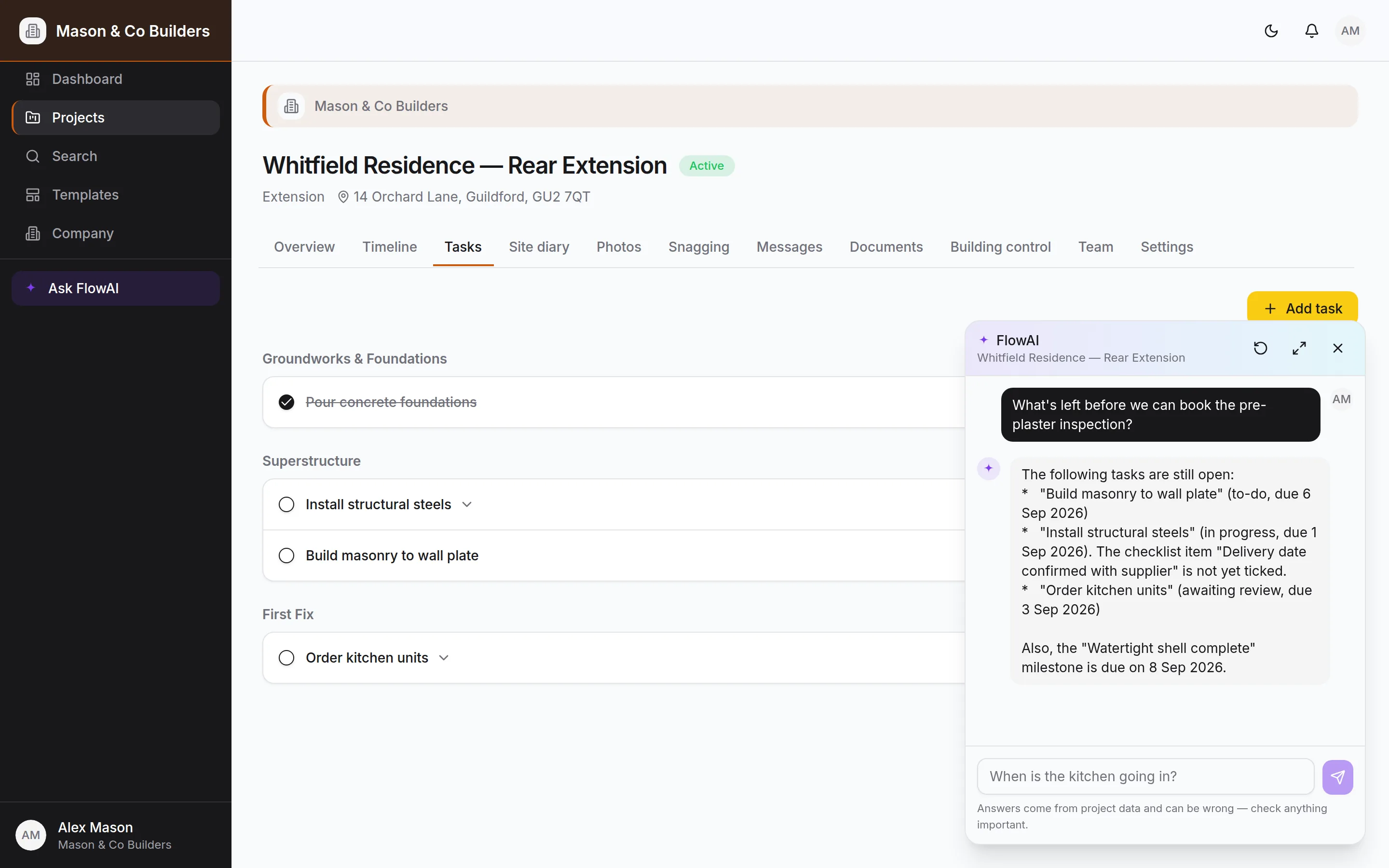
FlowAI is pinned to the bottom-right corner of every screen on Pro and Bespoke. It is given the project you are looking at — programme, tasks, snags, documents, diary, inspections — and answers from that rather than from the internet.
What it can see
Two sources, and the difference matters if you are wondering why an answer is what it is.
- A snapshot of the project sent with your question — the stages, recent tasks, snags, milestones, documents, inspections, certificates and messages. It is capped, newest first, and says so when it has left things out.
- Search tools that query the live database. These are the authority, and FlowAI uses them whenever it needs a specific record and always before proposing a change.
It also searches this documentation, so "how do I invite a client?" and "what goes in the handover pack?" get an answer with a link, not a guess.
Clients get a narrower FlowAI
A client's assistant has no access to the site diary, costs or margins, and cannot change the programme. It can post a message to the thread on their behalf, which is the right way for a request to reach you.
Questions worth asking
- "What's left before we can book the pre-plaster inspection?"
- "Which tasks are due in the next two weeks?"
- "Which snags are still open, and who is on them?"
- "What did we agree with the client about the kitchen worktops?"
- "What's blocked, and what's blocking it?"
- "Summarise the last fortnight for the client update."
The pattern is: questions about this specific job that you would otherwise answer by opening four tabs. It is not a search engine and it is not a surveyor.
Making changes
Ask it to change something and you get a proposal, not a change. A card appears naming the record as the database has it — resolved from the id, not from what FlowAI thought you meant — and nothing happens until you tap Confirm.
What it can propose:
- Set a task's status, assign it, tick a checklist item, create a task
- Set a snag's status, create a snag
- Create a stage, set stage progress, tick a milestone
- Post a message to the project thread
What it deliberately cannot do at all: delete anything, send invitations, change roles, change the plan, or approve documents. Those stay decisions a person makes in the interface.
Check the name on the card
The card names the record it resolved. If it says a task you did not mean, dismiss it and be more specific — that is exactly what the step is for.
Getting better answers
- Name things as they appear in the project. "Order kitchen units" beats "the kitchen thing".
- One change per message. Ask for three and you will get the first, plus a note about the rest.
- Give it the detail you want used. It will not invent a due date or a priority, and an unset field is better than a wrong one.
- Clear the thread when you change subject. The conversation is context; a stale one costs tokens and can confuse an answer.
What it costs, and what stops it
FlowAI is included in Pro and Bespoke. Underneath, usage is measured — not estimated — from what the model provider actually charges, and three things keep it bounded:
| Control | What it does |
|---|---|
| Bounded snapshot | Every list sent with a question is capped and says what it left out, so a big project does not send a big context. |
| Per-question token ceiling | One question has a limit across all of its steps. A normal exchange never approaches it; a runaway one stops within pennies and says so. |
| Repeat detection | The same search run twice is not run a third time — a model going in circles costs one round, not a fresh query each time. |
| Monthly company budget | A cap in Company settings, defaulting to a modest figure. Past it FlowAI declines rather than billing on. |
The monthly figure sits beside the spend total in Company settings. Leave it blank for no cap, or set it to something you would not mind seeing on a statement.
When it gets something wrong
It will, occasionally. Every reply carries a reminder that answers come from project data and can be wrong. Two habits make that manageable:
- 1.Treat an answer as a pointer, not a fact, for anything you would act on without checking — dates a client is relying on, or anything with money attached.
- 2.Read the proposal card rather than the sentence above it. The card is what will actually happen.
It is not giving structural, legal or building-regulations advice, and it is told to say so rather than have a go.