Running the programme
Stages, tasks, milestones and the site diary — how a job moves through BuildFlow week to week.
Updated 13 September 2026
A job in BuildFlow is a stack of stages. Everything else hangs off them: tasks sit under a stage, milestones mark the end of one, inspections are booked against them, and the client's progress bar is the average of them. Get the stages right and the rest follows.
Stages
A stage is a phase of work with a start, an end and a percentage. Templates generate the usual ones — Pre-construction, Groundworks & Foundations, Superstructure, First Fix, Second Fix, Finishes, Completion — and you adjust from there.
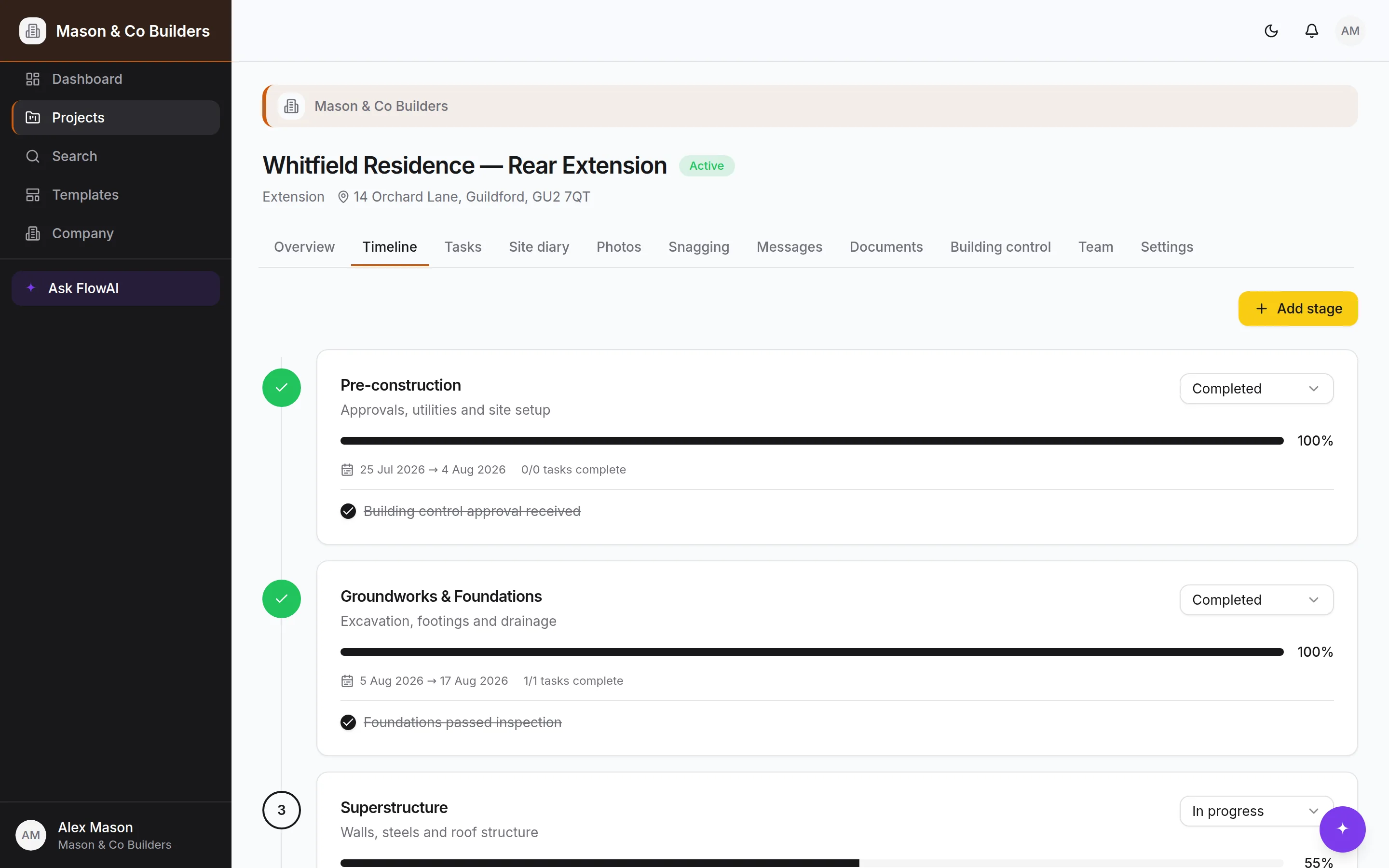
Each stage has a status (not started, in progress, blocked, completed) and a completion percentage you set in steps. Two things are worth being disciplined about:
- Blocked means blocked. A stage waiting on a delivery or a decision should say so, not sit at 60% looking healthy. The client seeing 'blocked' is a conversation you want to have early.
- Percentages are a judgement, not a calculation. Nobody expects them to be exact. They exist so the client can tell the difference between 'started' and 'nearly there'.
Tasks
Tasks sit under a stage, and each has a priority, a due date, an assignee and — where it helps — a checklist. Statuses run to-do, in progress, blocked, awaiting review, completed.
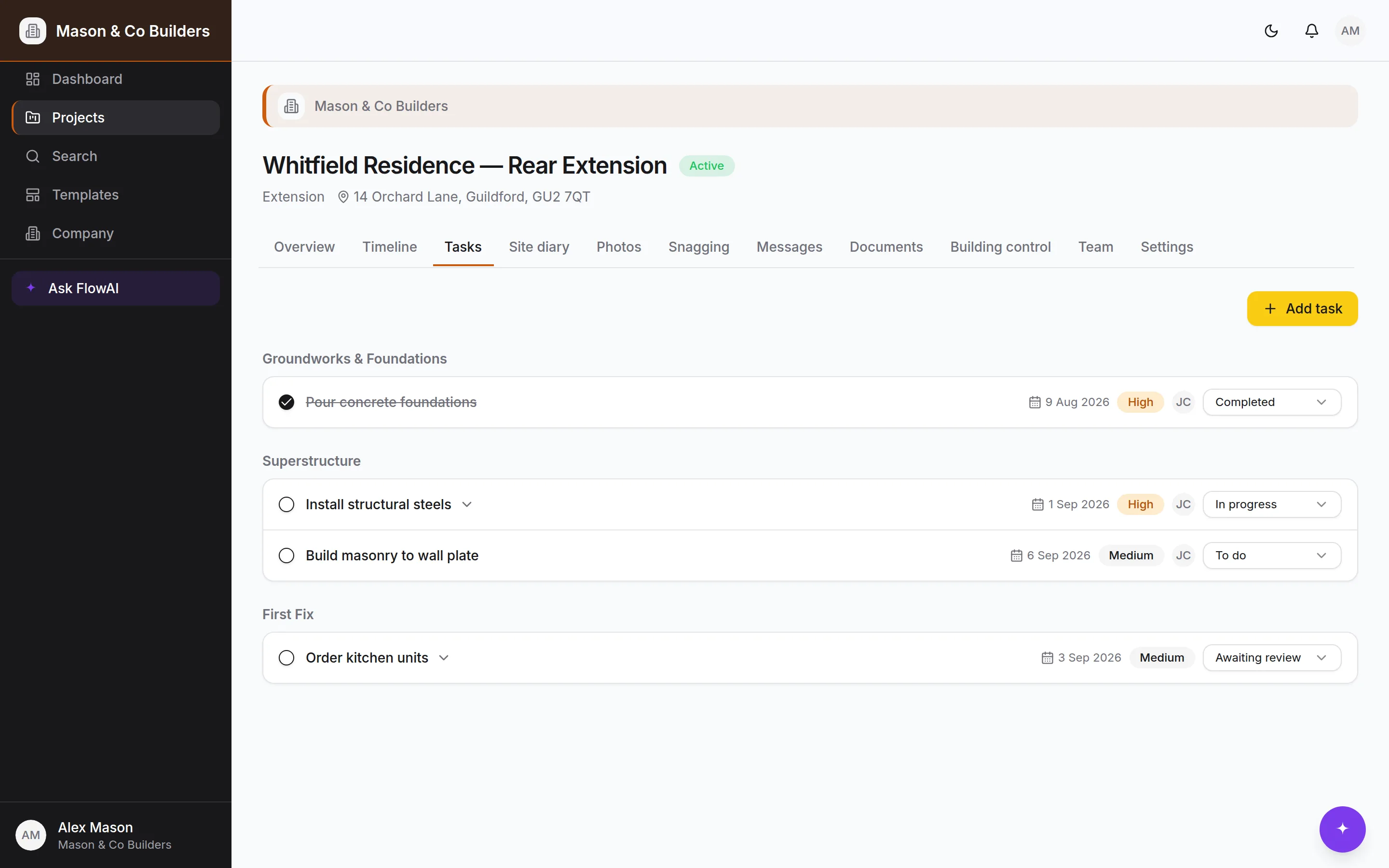
Awaiting review is the one people skip and then miss. It is for work that is done but needs somebody to look at it — your check on a subcontractor, or a client decision that unblocks the next thing. Left as 'in progress' it looks like work still happening.
Checklists are for the tasks where the detail is the work. "Install structural steels" is one task; "padstones set", "delivery date confirmed with supplier", "engineer's sign-off received" are the checklist under it. Ticking them off does not change the task status — that stays your call.
Assign to a person, not to a trade
Tasks assigned to a named person show on their dashboard and in their notifications. A task assigned to nobody is a task nobody has.
Where the percentage comes from
A stage that has milestones works its percentage out from how many are ticked, and shows you the count underneath. That makes the bar your client sees something they can check rather than something they have to take on trust. Stages with no milestones keep the 0/25/50/75/100 buttons.
Milestones
Milestones are the dates that mean something to somebody outside the job — watertight, first fix complete, kitchen fitted, practical completion. They have a due date and a done state, and you choose which ones the client can see.
A milestone can bring the money with it
Tie a payment to a milestone and ticking it makes that payment due, dates it from your terms and tells the client — which is the difference between a schedule that looks after itself and a list you have to remember. See Contracts and payments.
Keep the client-visible list short. Five or six across a job is plenty; twenty turns into noise and they stop looking.
The site diary
One entry per working day: weather, who was on site and for how long, what got done, what went wrong, what was delivered, who visited.
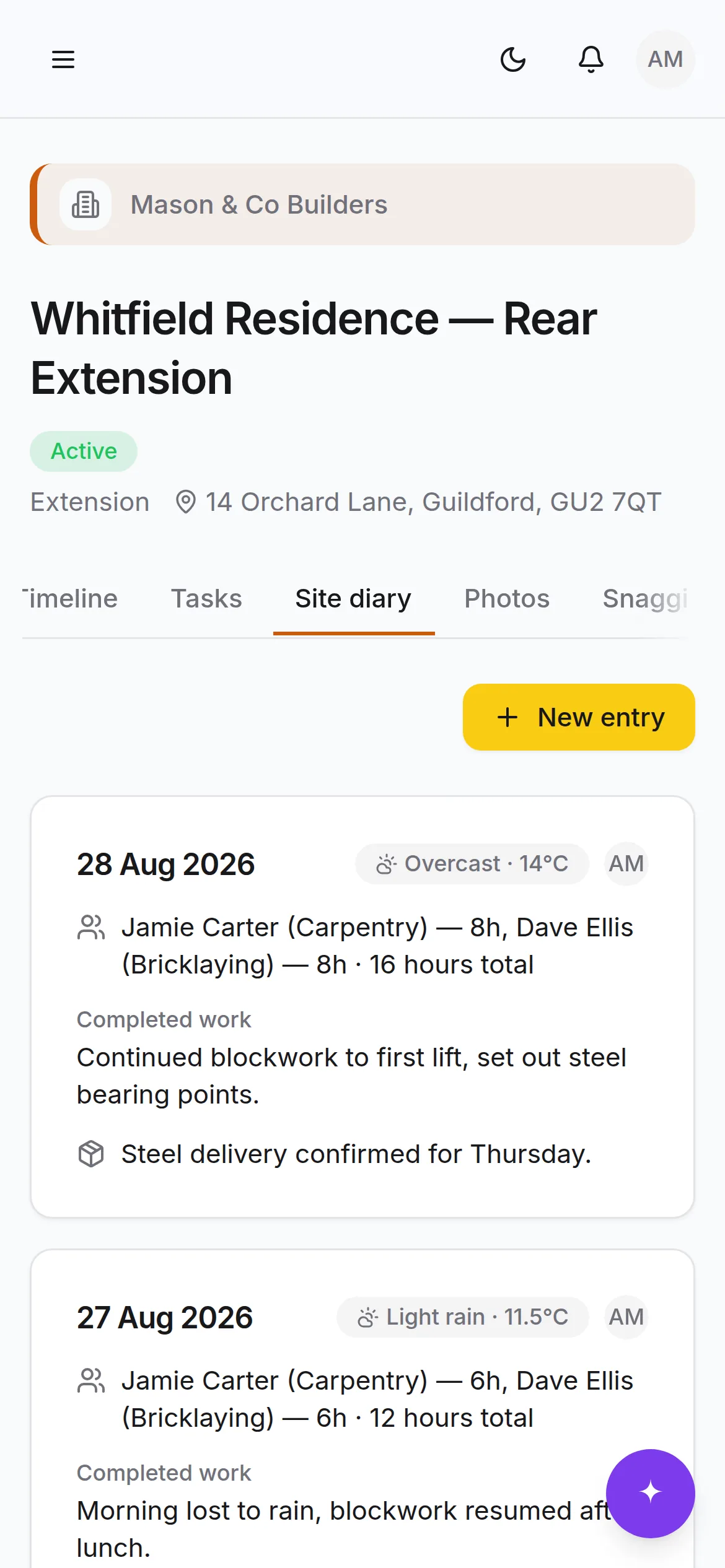
Two things make the diary worth the two minutes it takes:
- 1.Entries are permanent. They cannot be edited after the fact. That is the whole point — a record you can change is not a record, and a contemporaneous note about weather or a late delivery is the thing you want if a programme dispute ever comes up.
- 2.Clients never see it. Hours, costs, subcontractor problems and your own notes stay yours. This is enforced at the database, not by hiding the tab.
Speaking the diary instead of typing it
On a Pro plan, the Speak it button beside *Completed work* records what you say and writes it into the field. Talk for twenty seconds at the end of the day rather than filling in six boxes with cold hands.
- The text lands in the box for you to correct before saving — it is still your entry, not the machine's.
- Trade words are handled: merchants, materials, trades and bodies come out spelled properly, and “fifty mil” is written as 50mm.
- Three minutes is the limit for one note. Longer than that and typing is quicker anyway.
- Recordings are not kept. The diary entry is the record; the audio was only a way of getting there.
It counts against the same AI budget
Dictation is metered exactly like a FlowAI question, and it is cheap — about a fifth of a penny a minute. A modest monthly cap covers more dictation than anyone will do.
When there is no signal
Basements, steel frames and rural plots all take the phone signal away, and that is exactly where the diary gets written and the snag gets spotted. Three things keep working without it: writing a diary entry, reporting a snag, and ticking a task off.
- 1
Carry on as normal
Fill the form in and save it. You are told it has been saved on the phone rather than sent.
- 2
The header keeps count
“Offline — 2 waiting to send” shows what has not gone yet, so nothing is a surprise.
- 3
It sends itself
As soon as there is signal the queue goes up in order, and anyone who should be notified is notified then.
Nothing is thrown away quietly
If the server refuses something — say you logged the same date twice — it is held rather than dropped, and the header says so. You can read what you wrote, copy it out, try again, or discard it deliberately.
Progress photos
Take the photo, tag the room, trade and stage, and it files itself. Before, during and completed sit side by side, so showing a client why the wall had to come down takes a scroll rather than an evening in a photo library.
Photos live in private storage and are served through short-lived signed links. Nothing has a public URL, so a photo of someone's house cannot leak by being guessed at.
Photograph what you will cover up
Services before they're boarded, insulation before it's plastered, the DPC before the screed. Ten seconds each and worth a great deal later.
Building control
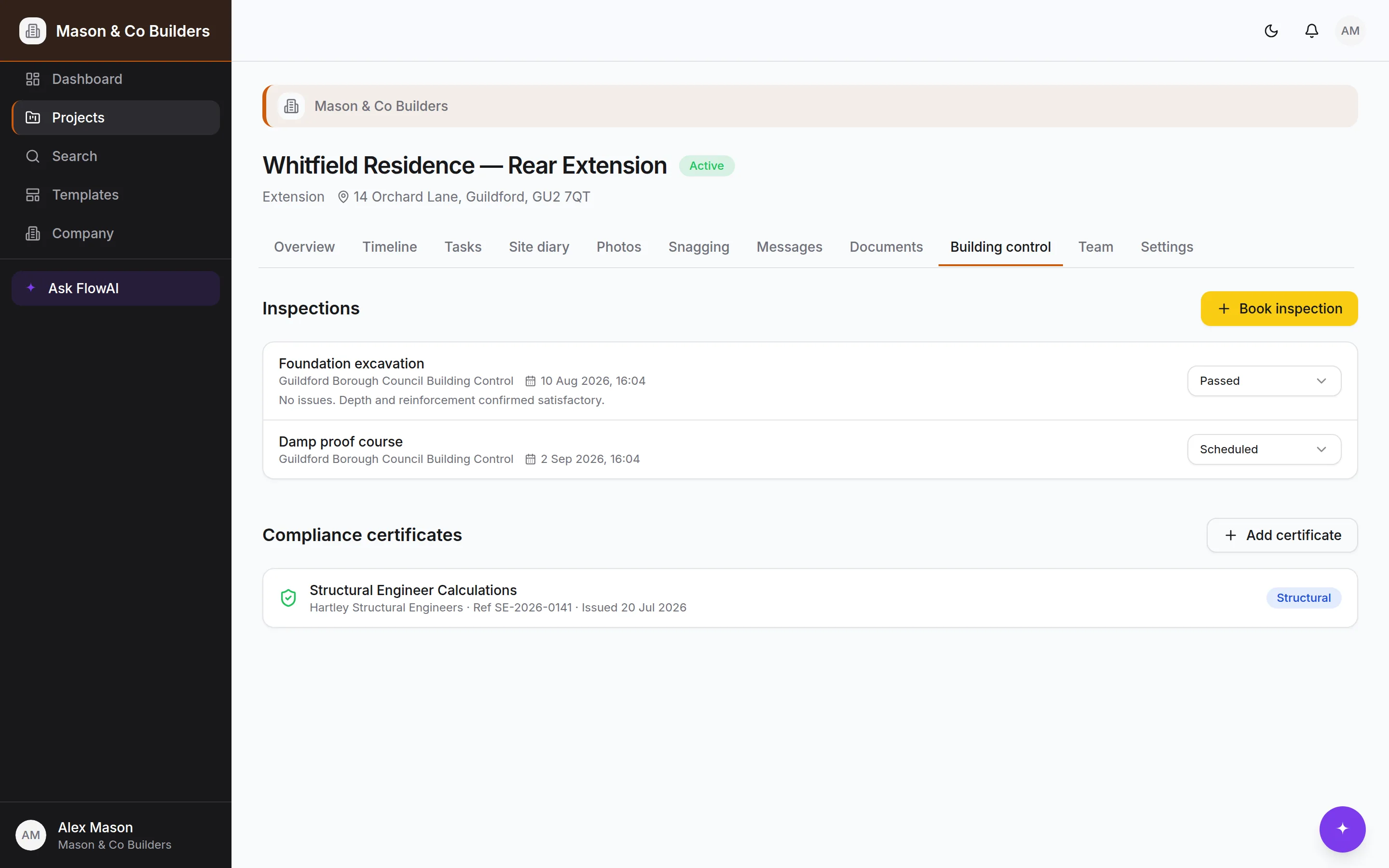
Inspections move through scheduled → passed, failed or reinspection, against the stage they belong to. Templates generate the ones a job of that type usually needs, and you add or drop as the drawings dictate.
Compliance certificates — electrical, Gas Safe, fire, structural, water, energy, completion — are filed against the job with the issuer, the reference and the date. Ones that expire get a reminder before they lapse.
A weekly rhythm that works
| When | What | How long |
|---|---|---|
| End of each day | Diary entry and two or three photos, from the phone | 2 minutes |
| As work moves | Task statuses, and stage percentage when it shifts | Seconds |
| Monday morning | Look at the week's due dates; move what has slipped | 10 minutes |
| Friday afternoon | Post one update to the client thread | 5 minutes |
| When it happens | Book or record an inspection; upload the certificate | 2 minutes |
Ask FlowAI
"Which tasks are due in the next two weeks?" and "What's blocked and who's on it?" are the two that save the most time on a Monday. It reads the live programme, so the answer is current.